10 Different QA Testing Types Explained: What You Must Know in 2026
Have you ever experienced an app that completely froze when you needed it the most, crashed while you were checking out, or simply didn’t give you what it had promised? Frustrating, isn’t it? Well, now, imagine your customers doing the same with your software. In a market where users leave products after one bad experience, providing perfect software is not a choice; it is a necessity for survival. And this is exactly the place where knowing the QA Testing Types becomes a game-changer.
Software nowadays is far more complex than it used to be in the past. It comprises systems, devices, networks, and user behaviors; therefore, a small mistake can result in a huge failure. QA testing is not only about bug hunting; it is about letting your users feel that your product is reliable, intuitive, and trustworthy from the very first interaction with it. A proper testing plan allows you to identify the issues at the early stage, thus gaining the users’ trust in your product and providing them with the experience they want to have.
In this blog, we will walk you through the various types of QA testing that you cannot do without. We will explain what they are, why they matter, and how each of them helps to create software that is stable, secure, and real-world-ready.
- Users of any software will want seamless, safe, and dependable digital experiences.
- Neglecting or improperly conducting quality assurance tests can make the software have bugs and crash, and thus the users become frustrated.
- Knowing different Types of QA Testing that means the software has to work under real conditions helps to understand the software’s functioning in such situations.
- Using a well-planned mix of manual, automated, and specialized testing not only makes products of better quality but also lowers the company’s costs over time.
- Various types of QA testing are to check the behavior of the software at every stage of the development process; thus, issues are caught before users get to see them.
- Manual testing brings a human view for usability and complicated scenarios, whereas automated testing is able to deliver quicker and more uniform results.
- Such tests as unit, integration, and system testing are to confirm the core functionality, whereas end-to-end and user acceptance testing are to confirm the usage in the real world.
- Furthermore, specialized testing like performance, regression, security, and accessibility is to keep the software stable, scalable, safe, and inclusive.
- Quality QA testing is not a matter of choosing one method; rather, it is about combining the right kinds of tests to provide high-quality software which users can rely on..
What is QA Software Testing?
QA software testing is one of the most important constituent parts of the software development lifecycle. The goal is to determine that the software is of the appropriate quality, that it is safe, reliable, and scalable, and that it is free from bugs. Given that the software development world is now settled in a DevOps and continuous delivery environment, the placement of QA testing at the earliest stages of development is now more important than ever.
In this manner, QA testing is tantamount to an insurance policy for your product. It identifies and displaces problems with the software before users do, protects reputation, and ultimately saves on the expensive corrective measures associated with software development.
Difference Between QA Testing and QC?
Quality Assurance (QA) concentrates on the elimination of defects through the improvement of processes, standards, and methodologies before the issues of the development arise. Quality Control (QC) is the process of locating and repairing defects in the end-product. QA is the process that ensures quality in the system; QC is the process of verifying quality after production.
| Aspect | QA (Quality Assurance) | QC (Quality Control) |
| Focus | Preventing defects | Identifying and fixing defects |
| Approach | Process-oriented | Product-oriented |
| Objective | Build quality into development workflows | Verify quality in the final product |
| Timing | Occurs throughout the development lifecycle | Conducted after development is complete or during testing |
| Responsibility | Everyone involved in the development process | Dedicated testing and inspection teams |
| Nature | Proactive | Reactive |
| Involvement | Establishes standards, best practices, and methodologies | Executes tests to detect issues and ensure product stability |
| Outcome | Minimizes future bugs and rework | Ensures the product meets quality expectations before release |
When Should You Use Automated vs. Manual Testing?
The mixture of manual as well as automated testing is very much required in QA. The question of selecting one method instead of the other does not arise here, but it is a matter of identifying the benefits of each one in different fields. Manual testing relies on human judgment and intuition, whereas automated testing is mostly about speed, accuracy, and scalability.
Use Manual Testing When:
- Testing user experience, design, or visual elements
- Validating complex scenarios that need human insight
- Performing exploratory or ad-hoc testing
- Handling features still changing frequently
- Evaluating usability or emotional responses
Use Automated Testing When:
- Running repetitive regression test suites
- Testing at scale across multiple devices or browsers
- Integrating with CI/CD for continuous releases
- Needing fast, error-free execution
- Validating stable and predictable workflows
Manual Testing vs Automated Testing
| Criteria | Manual Testing | Automated Testing |
| Execution | Human-driven | Script-driven |
| Speed | Slow | Fast |
| Best For | UX, exploratory, visual checks | Repetitive and regression tests |
| Accuracy | Prone to human error | Highly reliable |
| Scalability | Limited | High |
Also Check: Best AI Testing Tools for Smarter Testing
10 Different Types of Software QA Testing:
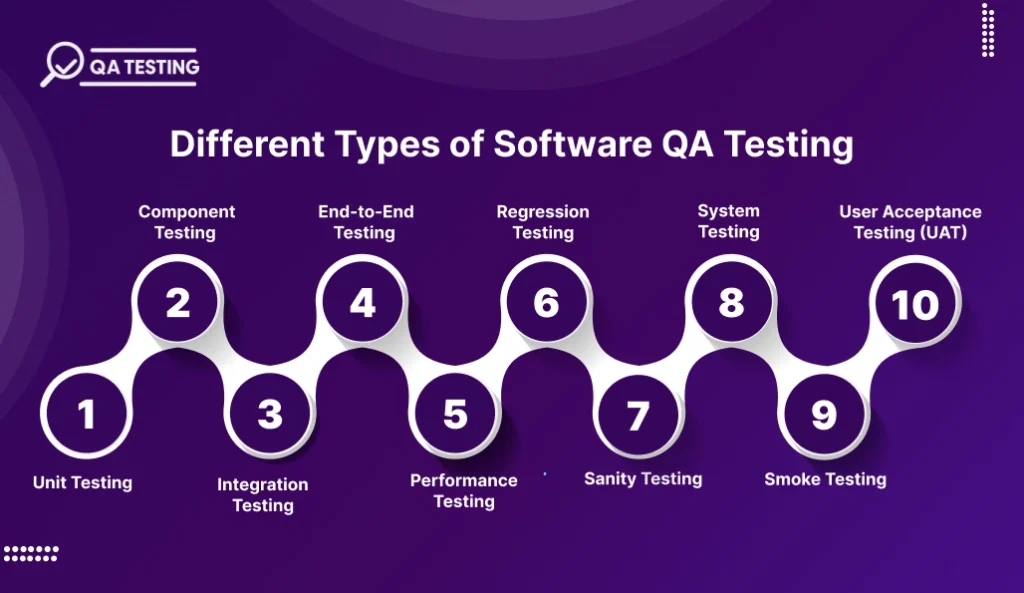
Most people do not see how testing branches out into other fields. One example is manual vs automated, but there are many other specialized branches of testing as well, to check if the software works how it is supposed to under different conditions. Here are the 10 different types of testing every dev team needs to know:
1. Unit Testing
Unit testing is the process of looking at code that has been broken down into separate pieces, and that is done to verify that each function, module, or method returns the expected results. By verifying the logic through this method at a very early stage of development, the bugs will not be able to spread to the rest of the system. This operation strengthens the code trustworthiness, makes the error correction process easier, and allows the subsequent modifications to be carried out faster and still maintain the same level of certainty.
- Tests the smallest units of code
- Conducted by developers during coding
- Prevents defects early in development
- Supports refactoring and clean code
- Reduces debugging time later
2. Component Testing
Component testing evaluates multiple related units grouped into functional components before system integration. It checks whether each component works correctly with real input and expected output. Detecting errors at this level prevents issues from surfacing later, improving efficiency and confidence in the software structure.
- Tests combined code modules
- Performed before system-level testing
- Uses real or production-like data
- Identifies hidden component defects
- Enhances modular reliability
3. Integration Testing
Integration testing confirms interactions between components, which means that it focuses on verifying the interactions between two or more components. This step, after each module has been tested separately, is the one that guarantees that the data flow, communication, and behavior are still the same in the parts that are linked. It confirms that the entire system functions smoothly when components are merged.
- Tests interaction between modules
- Detects integration-level issues
- Validates data exchange accuracy
- Ensures functional requirements are met
- Bridges unit and system testing
4. End-to-End Testing
End-to-end testing closely imitates actual user scenarios in order to check the entire flow of an application. The tests, which are very thorough, cover every step of a process chain, thus ensuring that features, systems, and integrations work smoothly and in harmony even under near-to-real conditions. Simply put, it is the primary goal of this testing to make sure that users are capable of carrying out expected operations without any hindrance.
- Mimics real-world user journeys
- Validates full application flow
- Tests integrations across services
- Ensures functionality under real conditions
- Confirms complete readiness for launch
5. Performance Testing
Performance testing is basically the evaluation of a software’s performance under increased loads, higher user volumes, or stressful conditions of any kind. The main metrics that are determined through this testing are responsiveness, stability, and scalability. Besides that, it is also the measure that keeps the software from crashing and helps it to have an uninterrupted flow of performance during maximum utilizations, important releases, as well as sudden traffic spikes.
- Tests speed and responsiveness
- Measures scalability under load
- Identifies performance bottlenecks
- Validates stability under pressure
- Ensures smooth user experience
6. Regression Testing
Regression testing ensures that new code changes, patches, or enhancements do not break existing functionality. By retesting previously validated features, it detects unintended consequences early. Automation makes regression testing especially efficient for frequent releases and rapid development cycles.
- Retests existing features after changes
- Detects unintended bugs
- Ideal for continuous updates
- Works well with automation
- Preserves software reliability
Also Read: Quality Engineering vs Quality Assurance: Which Is Best?
7. Sanity Testing
Sanity testing is a focused subset of regression testing, conducted after minor code changes or fixes. It verifies that recent modifications function correctly without breaking core features. If sanity tests fail, broader testing is paused until the build becomes stable.
- Validates recent updates quickly
- Confirms build stability
- Prevents deeper testing on faulty builds
- Narrow and targeted scope
- Saves time during releases
8. System Testing
System testing is a test that evaluates the entire software application as a single unified whole. It looks at functionality, behavior, and conformity to specified requirements. The aim is to verify that all the modules integrate properly and that the whole system yields the expected results.
- Tests full application behavior
- Ensures feature compliance
- Conducted after integration testing
- Includes functional and non-functional checks
- Validates overall system readiness
9. Smoke Testing
Smoke testing acts as a preliminary check to confirm basic software stability before deeper testing begins. It quickly identifies critical failures that prevent further testing. If the smoke test passes, the build is considered stable enough for detailed evaluations.
- Initial stability check
- Detects major failures early
- Prevents wasted testing effort
- Performed after new builds
- Ensures readiness for further tests
10. User Acceptance Testing (UAT)
User Acceptance Testing is essentially a check of the software against the demands of the actual world before the software is released. UAT interacts with the software in the same manner as an average user would and thus confirms that the software is usable, functions correctly and meets the user’s expectations. After UAT has been successfully completed, the product is then allowed to be released and is considered ready for deployment.
- Final step before launch
- Validates real-world usability
- Ensures business requirements are met
- Conducted by actual users or clients
- Confirms readiness for deployment
Beyond the Basics: Security and Accessibility Testing
With software progressively becoming a part of daily life, two testing areas have become very important: security testing and accessibility testing. In a scenario where cyberattacks are getting more and more complex and inclusivity is no longer a matter of choice, these testing types are essential for providing digital products that are safe, compliant, and user-friendly.
Security Testing
Security testing guarantees that a system is able to fight off hardware and software intending to harm it, any unauthorized access, and leakage of data. It confirms if the program is resistant to an attack and able to keep secret information safe. Present-day development methodologies have changed to comprise automated vulnerability scanning, penetration testing, and continuous monitoring in the CI/CD pipeline. Through security testing, the opportunities for disaster can be averted, the image of the company can be kept safe, and the confidence of the customers can be secured due to the fact that weaknesses are located at the earliest stage.
- Detects vulnerabilities before release
- Protects sensitive user data and system integrity
- Uses penetration testing and automated security scans
- Integrates easily with CI/CD processes
- Reduces risk of cyberattacks and compliance failures
Accessibility Testing
accessible testing is a kind of testing that makes sure that the application is available to every person, even those who have some kind of disability. It assesses the adherence to standards like WCAG (web content accessibility guidelines) so that users do not face any kind of barriers because of their differences. Namely, accessibility testing is the main tool that gives the opportunity to the whole digital community to be really included, as it enhances the user’s ability to get around, to read and to interact.
- Ensures usability for people with disabilities
- Checks compliance with accessibility standards like WCAG
- Improves user experience for broader audiences
- Enhances product perception and brand responsibility
- Supports legal and ethical requirements for digital accessibility
Collaborate with Professionals to Gain Detailed QA Assistance
You need to make it software that can survive different kinds of challenges and also be tested rigorously as part of Quality Assurance (QA) Best Practices. To deliver excellent QA efficiently, it is essential to have AI-driven automation, cloud testing environments, and integrations with DevOps toolchains. There might be a lack of know-how, tools, and resources in your company for carrying out QA testing as a separate function of the department.
Conclusion
Software quality cannot be called a luxury anymore; it has become an expectation. Knowing and using the right Types of QA Testing guarantee your product to be responsive and safe, and it can be trusted to work in the same way with different environments and user scenarios. Every testing type has a certain ‘thing’ that it brings, be it defect prevention, feature validation, data protection, or user accessibility assurance. If used strategically, QA testing acts as a risk alleviation tool, release accelerator, and user satisfaction increase.
The corporate entities that embrace thorough testing methodologies are not only the ones who will be able to deliver top-notch products, but they will also become the leaders in the market. In the current digital world, a strong QA is not an option; rather, it is the basis of software success that will last.
Ready to Improve Your Software Quality?
Without proper testing, your digital product won’t reach its full potential. Whether you need QA testing for a new application, want to optimize your current testing processes, or are considering outsourcing to qualified QA professionals, we’re here to help.
Building and maintaining a comprehensive QA testing program requires expertise, resources, and investment in specialized tools and training. Don’t let inadequate testing hold back your success.
Professional QA testing can transform your software quality and user satisfaction. Visit QA Testing today to explore our complete testing services and schedule a consultation with our QA specialists.
FAQ
1. What is the main purpose of QA testing?
The purpose of QA testing is to ensure software works as intended without errors. It identifies issues early, improves performance, enhances user experience, and prevents costly failures after launch, ensuring the product is stable, reliable, and ready for real-world use.
2. Is QA testing required for every software project?
Yes. Every software project, regardless of size or complexity, needs QA testing. Without it, hidden bugs, performance issues, or security flaws can damage user trust, increase development costs, and negatively impact brand reputation after release.
3. Can automated testing fully replace manual testing?
No. Automated testing speeds up repetitive tasks, but it cannot replace human insight. Manual testing is essential for usability, visual validation, and complex scenarios. The best QA strategy combines both methods for accuracy, scalability, and better user experience.
4. Why does QA testing take time?
QA testing takes time because every feature, workflow, and integration must be validated. Testing ensures stability under different conditions, avoids last-minute failures, and confirms the software functions correctly. A thorough process protects against expensive fixes later.
5. Is QA testing expensive?
QA testing costs vary depending on complexity, but it is far cheaper than fixing issues after launch. Investing in QA reduces long-term expenses, protects brand credibility, and ensures software quality, making it a cost-effective part of development.

Pankaj Arora
Founder, QA Testing

Pankaj Arora is a seasoned technology leader and the Founder of QA Testing, with over 10+ years of experience in delivering high-quality software testing solutions. He specializes in quality assurance strategy, automated testing, AI-driven validation, and performance optimization. Under his leadership, QA Testing has become a trusted partner for startups and enterprises, ensuring secure, reliable, and seamless quality assurance across web, mobile, and enterprise applications.